Any updates about RiscOS on the Raspberry Pi?
 627 posts, 80 voices
Pages: 1 ... 7 8 9 10 11 12 13 14 15 16 17 18 19 20 21 22 23 24 25 26
 Alan Buckley (167)
232 posts
Alan Buckley (167)
232 posts
|
I’m debugging a new version of PackMan now which will prompt to backup SharedUnixLib and replace it. Hopefully that will make it a little easier to get started with if you already have SharedUnixLib installed. (This is a general procedure that applies to any package).
I spoke to Graham who runs the RiscPkg site about this a while ago and he said he could host a new package index for ARMv7. Once this list in place, it would just require the package maintainers to add there ARMv7 safe packages to this list via the web interface. |
 Fred Graute (114)
627 posts
Fred Graute (114)
627 posts
|
No need, it comes built in. Just open the Filer configure plug-in and turn on the corresponding option. |
 Andrew Flegg (1574)
28 posts
Andrew Flegg (1574)
28 posts
|
That should work; though the comments are misleading as that segment’s not written by Acorn ;-) Is there a reason why SparkFS is in |
 Jeffrey Lee (213)
6046 posts
Jeffrey Lee (213)
6046 posts
|
Theo:
The version of ArcEm on riscos.info, I assume? That looks like it’s a pretty old version, and so doesn’t have all the performance/graphics/sound improvements that I made last year (or was it earlier this year? I forget). Plus I suspect the X11 frontend is quite slow compared to the native RISC OS one. Unfortunately the native RISC OS frontend doesn’t support 32bpp screen modes, so until the Pi video driver is finished, or I find some time to do some more work on ArcEm, the X11 frontend is really the only choice available. On the subject of games for the disc image: how about SDL Asylum? With any luck a few ex-Acorn users will remember it, and it’s certainly something a bit more Acorny than all the usual SDL game ports from Linux/Windows. |
 Trevor Johnson (329)
1645 posts
Trevor Johnson (329)
1645 posts
|
Looks like I missed this! Thanks. |
 Ben Avison (25)
445 posts
Ben Avison (25)
445 posts
|
I just grabbed a copy of Chris’s distro – thanks, Chris, for integrating my disc format so quickly. One question, though – why are there so many files in the FAT partition? I’m sure I used to manage with just start.elf, config.txt and riscos.img, now there are several more, and two copies of the RISC OS image for some reason… |
 Chris Evans (457)
1614 posts
Chris Evans (457)
1614 posts
|
“On the list of attendees is “Dave Walker” – what’s the likelihood that it is the Acorn DW? :-)” |
 Chris Hall (132)
3503 posts
Chris Hall (132)
3503 posts
|
and two copies of the RISC OS image for some reason… Mea culpa. Noone noticed before. Anyway they are mostly harmless. (u-boot.bin and riscoszz.img are indeed superfluous and I didn’t realise they were still there until you mentioned it). You do need bootcode.bin, commandline.txt and loader.bin but I’m not sure about preenv.txt. |
|
Jeffrey Lee (213)
6046 posts
|
preenv.txt is a u-boot thing, so you don’t need it. |
 Tim Moore (1586)
2 posts
Tim Moore (1586)
2 posts
|
I see the latest image is 2Gb now. Any way of shrinking that? The only spare SDs I have are 256mb and kind of ideal really as don’t see a need to waste a 2Gb on this. Is there a way I can shrink the image myself if it’s all just free space? (either under linux or Windows). Oh, and great work by the way! |
 Steve Pampling (1551)
7932 posts
Steve Pampling (1551)
7932 posts
|
Is there a way I can shrink the image myself if it’s all just free space? (either under linux or Windows). http://www.partitionwizard.com/ Home edition (windows based freeware) work on a backup copy of the SD card of course |
|
Chris Hall (132)
3503 posts
|
I see the latest image is 2Gb now. Any way of shrinking that? No. 2Gbyte SD cards can be obtained for about £4. Is there a way I can shrink the image myself It would be about a week’s work to do this as partitioning software is not sufficient. The RISC OS partition contains a DOS image file that is mapped to the FAT partition manually. It would cost at least £500 to commission such work. Any other sizes that are produced are likely to be bigger (to give more storage space for RISC OS or to have other partitions for other operating systems). |
|
Chris Hall (132)
3503 posts
|
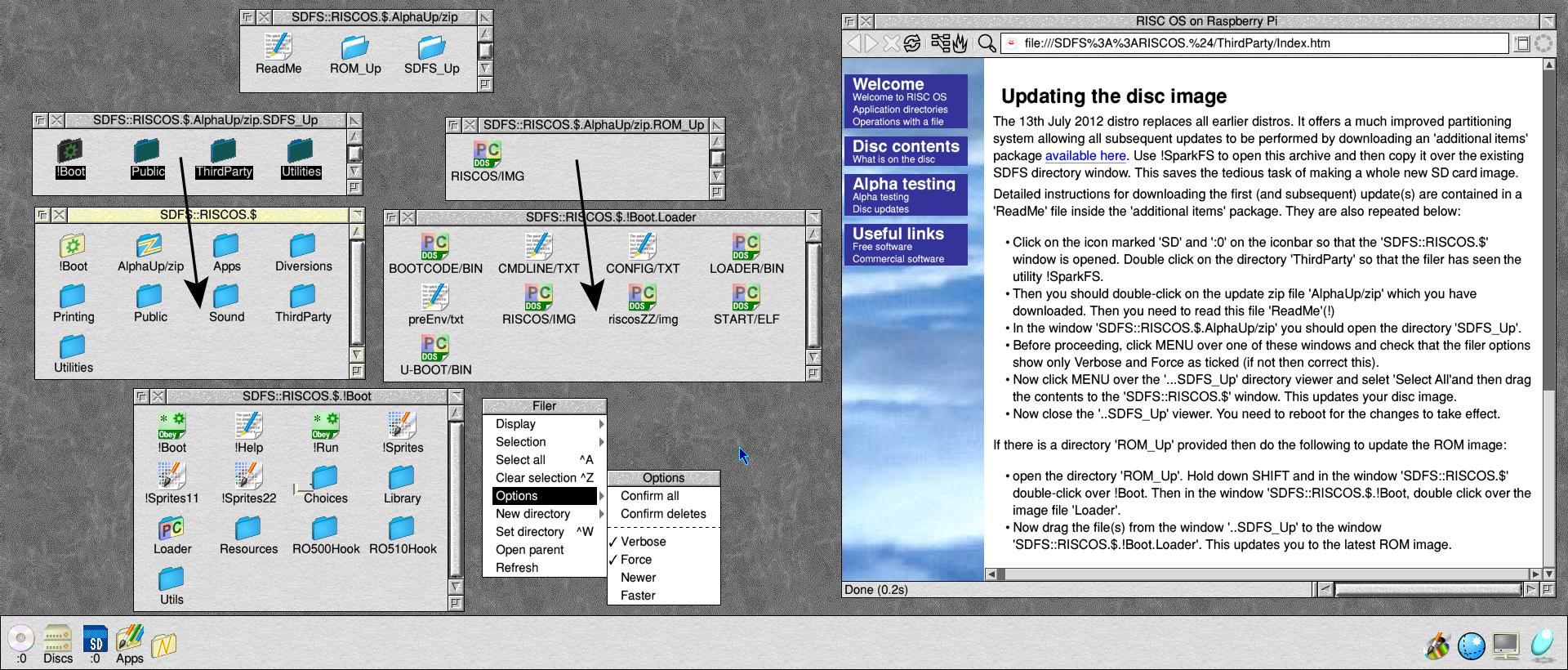
Now that the 13 July 2012 distro is ‘stable’ and should not need to change whilst it remains ‘alpha’, I have produced an update here Instructions follow (after this update the instructions will be on the Pi):
Then you should double-click on the update zip file ‘AlphaUp/zip’ which you have downloaded. In the window ‘SDFS::RISCOS.$.AlphaUp/zip’ you should open the directory ‘SDFS_Up’. Before proceeding, click MENU over one of these windows and check that the filer options show only Verbose and Force as ticked (if not then correct this). Now click MENU over the ‘…SDFS_Up’ directory viewer and selet ‘Select All’and then drag the contents to the ‘SDFS::RISCOS.$’ window. This updates your disc image. Now close the ‘..SDFS_Up’ viewer. You need to reboot for the changes to take effect. [ ignore this bit – no ROM update yet open the directory ‘ROM_Up’. Hold down SHIFT and in the window ‘SDFS::RISCOS.$’ double-click over !Boot. Then in the window ‘SDFS::RISCOS.$.!Boot, double click over the image file ’Loader’. Now drag the file(s) from the window ‘..SDFS_Up’ to the window ‘SDFS::RISCOS.$.!Boot.Loader’. This updates you to the latest ROM image.
or see full size screen shot The following things have been added or corrected: Update 1 The utility ‘!SparkFS’ in $.Third Party will now be seen on boot so that double-clicking on an The utility !InterGIF has been added to $.Utilities. The module Fat32FS has been added so that FAT-formatted USB pen drives greater than 2Gbytes can be handled correctly. The source for Netsurf has been added in Public.Sources as this is a licence requirement. You may delete it if you do not require it. The documentation seen on start up (the ‘welcome’ page) has been improved. Sat 14th July 2012. |
 Jess Hampshire (158)
864 posts
Jess Hampshire (158)
864 posts
|
Chris did you get my email about packman? |
|
Chris Hall (132)
3503 posts
|
Chris did you get my email about packman? Yes. Work in progress. |
|
Ben Avison (25)
445 posts
|
I wondered why you advocated that people go tinkering inside their !Boot to do upgrades, rather than just supplying a !Boot directory to merge. To investigate, I tried copying a !Boot containing a Loader directory containing a new riscos/img over my existing one. Result: both Filer_Action and *Copy have an amusing bug where they copy the filetype and access permissions of the Loader directory (filetype FFD / user RW bits unused) over to the destination Loader image file without checking that one is a directory and the other a file. Oops. Was this the reason for your thinking? I note that the Boot Merge tool in !Configure works perfectly, though. In other news, I think CMOS RAM emulation for the Pi is done now. Enjoy, everyone. |
 Keith Dunlop (214)
162 posts
Keith Dunlop (214)
162 posts
|
Ben, when I was looking at this yesterday I was a bit suprised to see that it wasn’t just a skeleton !Boot which you then use Configure to deal with everything. If it works I wish I had had CMOS yesterday – would have made my desktop look even nicer when I was presenting RISC OS at the Cambridge Raspberry Jam. Speaking of which the best reaction to RISC OS on a Raspberry Pi was actually Mr. Upton himself: “This is f***ing amazing!” |
 Michael Drake (88)
335 posts
Michael Drake (88)
335 posts
|
There’s a guide to merging !Boot and !System directories on the NetSurf site: http://www.netsurf-browser.org/documentation/resinstall It’s also supplied with NetSurf: file:///<NetSurf$Dir>/Docs/documentation/resinstall_en |
 chris davey (1534)
5 posts
chris davey (1534)
5 posts
|
Chris H. The problem with the bottom bit of the screen not being display seen to have been fixed if you add framebuffer_align=0×100000 to the config.txt which you have in the distro release. |
 Jonathan Dawes (1547)
26 posts
Jonathan Dawes (1547)
26 posts
|
Just to zoom back in time for a moment, did people manage to get VNC working on the Pi? The post I saw said that you need to set the colour depth to 32K colours for it to work, but I can’t see how you can do that as it’s fixed to 16M colours. When I try connecting to it it takes a long time before finally giving up. If I try to connect to to an incorrect address if gives up right away. Is there a display number you should connet to like 1.1.1.1:1? |
|
Tim Moore (1586)
2 posts
|
Yeah, was just planning to spend as little as possible on the Pi as otherwise makes it kind of pointless being so cheap. It’s not that I can’t afford it, just it’s a principle thing :D. Though if the image will get bigger than 2Gb then I need something bigger obviously. How big could it grow to? I’ve got a 2Gb just it’s in one of my cameras. Also a 16Gb I’m using for Debian. I’ll play with it on that. If we can end up dual booting RISC OS with other OS though that would be cool. Rest of my cards are old, 256, 128 etc, hence was thinking RISC OS shouldn’t need much space and ideal to re-use one of these. I like to re-use things. My main cards are all CF cards for my big camera. |
|
Ben Avison (25)
445 posts
|
The size of the image might change following discussions with the Raspberry Pi Foundation, but 2 GB feels like a good size to me at the moment – it’s the smallest and cheapest size that’s easily available to buy new at the moment, and you can always use the same image on a card that’s actually bigger. It would be extra effort for someone like Chris to maintain images in a range of sizes, certainly at this early stage (maybe later an autobuilder might make it more practical). In any case, 2 GB is huge by RISC OS standards, and if you really need more space, you can always use a USB drive.
I’ve squashed both those bugs now. |
|
Chris Hall (132)
3503 posts
|
I wondered why you advocated that people go tinkering inside their !Boot to do upgrades I knew that would work and hadn’t thought that you could copy a directory containing an ordinary directory ‘Loader’ containing a single file on top of a directory where the destination file/directory ‘Loader’ is an image file. Never thought that might work! Will experiment (once the next rom is built and I have checked it works). |
 Theo Markettos (89)
919 posts
Theo Markettos (89)
919 posts
|
Tim, it is possible to make a smaller disc image, but it’s quite painful at the moment. You need to:
There’s loads of chicken-and-egg stuff here (eg how do you copy files from Chris’ distro when you can’t read it without writing it to an SD card first). This can all be done with RPCemu and disk images, and only imaging the SD in the final step. But it’ll sufficiently painful that you probably just want to pay the money and use a bigger card (or borrow one, for the duration of setting it up, perhaps using a second card in a USB reader). I also don’t know how this interacts with Ben’s !Boot.Loader hack…don’t know if that needs special magic to know where the FAT partition is. |
|
Chris Hall (132)
3503 posts
|
don’t know if that needs special magic to know where the FAT partition is. Oh Yes I think it does – the RISC OS partition has to extend over the top of the FAT partition so that it can write there. The two partitions overlap but the partition table is tweaked (as an overlap would be seen as a broken partition table) to make them look like they abut. |
Pages: 1 ... 7 8 9 10 11 12 13 14 15 16 17 18 19 20 21 22 23 24 25 26